For small businesses, ranking locally is no longer just about keywords and backlinks. Search engines need context, and schema markup provides that. By adding structured data to your website, you help Google understand your business details like services, reviews, and locations, making it easier for customers to find and trust you.
At ByronBayAirportTransfers, implementing LocalBusiness schema highlighted service areas and opening hours. Within months, their listing started showing rich details in Maps, boosting both visibility and bookings.
What Schema Markups Are Valid for a Local Business?
Schema is not one-size-fits-all. Local businesses can benefit from a variety of schema types to highlight unique offerings:
- LocalBusiness schema – Defines your business category, address, and hours.
- Organization schema – Provides general information about your business.
- Service schema – Highlights specific services you provide.
- Product schema – Important if you sell products.
- Review & Rating schema – Displays customer feedback directly in search results.
- FAQ schema – Perfect for answering common questions and showing them in SERPs.
- Event schema – Ideal for businesses hosting events or workshops.
| Schema Type | Purpose | Example Use Case |
| LocalBusiness | Identify local business details | “Dentist in Sydney” with address & NAP |
| Service | Highlight services offered | “Tax consultation services” |
| Review | Showcase customer ratings | Star ratings for “best hostel near me” |
| FAQ | Add Q&A to search results | Questions about pricing or policies |
Serenity Hostels added Review and LocalBusiness schema. Their star ratings began appearing in SERPs, which increased click-throughs from searches like “budget hostel near me.”
Individual Schema vs Nested Schema for a Local Business
When adding structured data, you can either keep schema separate (individual) or combine multiple types within one markup (nested). Both have their place.
| Approach | Definition | Pros | Cons | Best Use Case |
| Individual Schema | Each schema type is added separately | Simple to set up, easier to debug | Can be repetitive, less efficient | Small sites with basic schema requirements |
| Nested Schema | Multiple schema types are embedded within each other | Richer context, preferred for complex businesses | More complex to implement, prone to errors | Businesses with multiple services/products |
For Nanak Accountants and Associates, we implemented nested schema combining LocalBusiness + Service + Review. This improved their visibility for “tax consultant near me” by showing both location info and service details in one snippet.
Importance of Implementing Local Business Schema Markup
Schema markup isn’t just a technical add-on — it’s a trust and visibility booster for local businesses. When search engines understand your business details with accuracy, they reward you by showing rich snippets like star ratings, FAQs, and service highlights directly in search results. This increases your chances of being noticed over competitors.
- Enhanced visibility: Your business stands out with more details in SERPs.
- Higher click-through rates: Rich snippets grab attention and drive more traffic.
- Improved trust: Showing reviews, ratings, and business info builds credibility instantly.
- Direct impact on local searches: Correct schema helps Google place you on Maps and “near me” searches accurately.
For ByronBayAirportTransfers, adding LocalBusiness schema with service details not only boosted their map visibility but also improved trust signals with potential customers, driving higher bookings.
Tools to Generate Schema Markup for Local Business
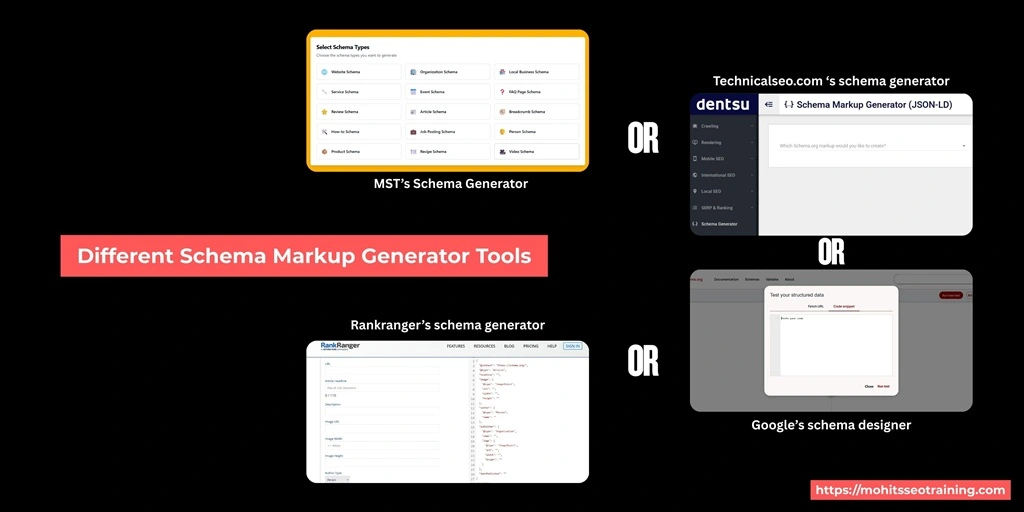
Not every business owner needs to code. Thankfully, several tools simplify schema creation:
- Mohit’s SEO Training Schema Markup Generator – Easy-to-use tool tailored for local businesses.
- Google Structured Data Markup Helper – Beginner-friendly interface.
- Schema.org – Reference library for every schema type.
- Merkle Schema Generator – Handy generator for JSON-LD snippets.
- Rank Math / Yoast – Plugins for WordPress users.
| Tool | Ease of Use | Best For |
| Mohit’s SEO Training Generator | ★★★★★ | Local businesses & students |
| Google Structured Data Helper | ★★★★☆ | Beginners creating first schema |
| Schema.org | ★★★☆☆ | Developers looking for schema library |
| Merkle Generator | ★★★★☆ | Quick JSON-LD creation |
| Rank Math / Yoast | ★★★★★ | WordPress users managing schema easily |
We used Mohit’s Schema Generator for Serenity Hostels, helping them quickly add Review and FAQ schema. This directly contributed to increased organic bookings.
How to Install Local SEO Schema Markup
Implementing schema doesn’t require a developer if you use the right approach. Here’s a practical step-by-step:
- Choose the schema type: Start with LocalBusiness, then layer in Review, Service, or FAQ schema.
- Generate the markup: Use Mohit’s SEO Training Schema Markup Generator or other tools to create clean JSON-LD code.
- Place the code on your website:
- Add the JSON-LD script only in the <head> section of your site.
- For WordPress, use plugins like Rank Math or Yoast to embed schema without touching code.
- For Shopify or custom websites, paste the code directly into theme files or schema injection fields.
- Test the implementation: Run the page through Google’s Rich Results Test to confirm accuracy.
- Monitor performance: Use Google Search Console → Enhancements → Review or LocalBusiness schema to track how your structured data is performing.
- Update regularly: Whenever business details (like opening hours or services) change, update the schema to avoid mismatches.
Common mistakes to avoid:
- Using wrong schema types.
- Forgetting to keep NAP consistent.
- Adding schema that doesn’t match on-page content.
At ByronBayAirportTransfers, proper installation of LocalBusiness schema ensured their address appeared accurately across Google Maps and organic results.
Local Schema Best Practices With Multiple Stores
Managing schema for a single location is simple. But if you’re a brand with multiple branches, implementation requires more care:
- Unique schema per store: Each branch should have its own LocalBusiness schema with details like address, phone, and opening hours.
- Dedicated landing pages: Don’t point all locations to the same “Contact” page. Create location-specific pages and add schema to each.
- Geocoordinates for precision: Adding latitude and longitude helps Google pinpoint your store on Maps, reducing errors in local searches.
- Consistent categories: Use consistent schema types across locations (e.g., Restaurant or Accountant) but customize details like services and timings.
- Sync with Google Business Profile: Schema should mirror your GBP data — mismatches can reduce trust signals.
- Branch-level reviews: Add Review schema for each store, not just the head office, to capture customer sentiment locally.
For Nanak Accountants and Associates, we implemented individual LocalBusiness schema for each office. With unique landing pages, reviews, and schema per branch, they saw increased visibility in multiple cities where they operate.
Does Implementing Local Business Schema Increase Your Traffic?
Yes, but indirectly. Schema doesn’t guarantee higher rankings, but it makes your listing richer and more clickable. Features like star ratings, FAQs, and service highlights draw user attention, boosting click-through rates — which often translates to more traffic and leads.
Serenity Hostels noticed a 25% increase in clicks after adding schema that showed star ratings and FAQs, proving schema directly improved engagement.
Common Challenges in Implementing Local Business Schema Markups
Adding schema markup is powerful, but not always straightforward. Many businesses face hurdles that can limit results if not handled carefully:
- Duplicate or conflicting schema: Some websites unknowingly add multiple schema codes (via plugins + manual code), which confuses search engines.
- Misuse of nested schema: Nesting schema incorrectly (like putting review schema outside LocalBusiness schema) can cause errors and prevent eligibility for rich results.
- Mismatch with visible content: Schema must always reflect what’s on the page. For example, if you add Review schema but don’t display reviews on the site, Google may flag it.
- Inconsistent business information: A common mistake is mismatched Name, Address, and Phone (NAP) across schema, business directories, and the website. Consistency is key for trust.
- Lack of validation: Many businesses add schema but never test it. Without tools like Google’s Rich Results Test or Search Console, errors can go unnoticed.
At ByronBayAirportTransfers, we identified duplicate LocalBusiness schema created by both a theme and a plugin. After cleaning up and consolidating schema, these businesses witnesses a boost in their organic visibility.
Conclusion
Schema markup is no longer optional for local SEO — it’s a necessity. From highlighting reviews to clarifying services, structured data makes your business stand out in competitive local searches. Start with LocalBusiness schema, expand into Reviews and FAQs, and always validate your implementation. The payoff is higher visibility, stronger trust, and ultimately, more local customers.
FAQs
What is schema markup in local SEO?
Schema markup is structured data that helps search engines understand and display your business details more effectively.
Does schema markup improve local rankings?
It improves CTR by making listings more attractive, which can indirectly boost rankings.
Should I use individual or nested schema?
Nested schema works better for businesses with multiple services or locations, while individual schema is fine for simple needs.
Can I add schema markup without coding?
Yes, tools like Mohit’s Schema Generator, Rank Math, or Google’s helper allow no-code schema creation.
How do I know if my schema is implemented correctly?
Use Google’s Rich Results Test and monitor Search Console for errors or warnings.

Mohit Verma
Contributor at Mohit's SEO Training.